Hello everyone
In this post, I will introduce how to troubleshoot AP joining process. I think it is very tough, but I will try to do my best.
(I have listed some references which are good resources to understand AP joining process, if you have time please read them. )
When you troubleshoot AP joining process you meet the first question that is "Where do I start or how do I begin" (Maybe this question is not just for troubleshooting this issue, possibility, for all of troubleshooting issues. :) )
The answer is that you need to have a plan and always modify your plan if the parameters of the problem change while you are troubleshooting.
// The plan of troubleshooting AP joining process //
1.
Understand the AP join process
If you understand it, you job will be much easier !!. Know the correct sequence of AP join process. See. What is Capwap? .
(After you collectl logs or packet capture, comparing with the correct sequence to identify where is the problem. )
2.
Understand your topology and Gathering logs
When your network has more than one AP and WLC, you should know which AP cannot join which WLC from topology. Once you identity that, you can start to gather logs from WLC and AP
"show run-config" and "show tech-support" are very important things, since you will understand the setting on WLC and AP.
/// options for complicate issues ///
For the difficult issue, you need to use the magic tool -- debug and packet capture. I will introduce some basic debugs, but remember modify your plan if the parameters of the problem change.
* WLC debug *
(WLC) > debug capwap events enable
(WLC) > debug capwap errors enable
* AP debug *
( AP )# debug capwap client event
( AP )# debug capwap client error
3.
Analyzing data collected
If you find that ping is failure, it means your network readability has the problem. It is better to check your infrastructure.
"show ap join stats detail AP_Mac_address" is also very useful, since it can give you some hits about the last discovery request and last join request were sent from AP. See detail from the reference 5
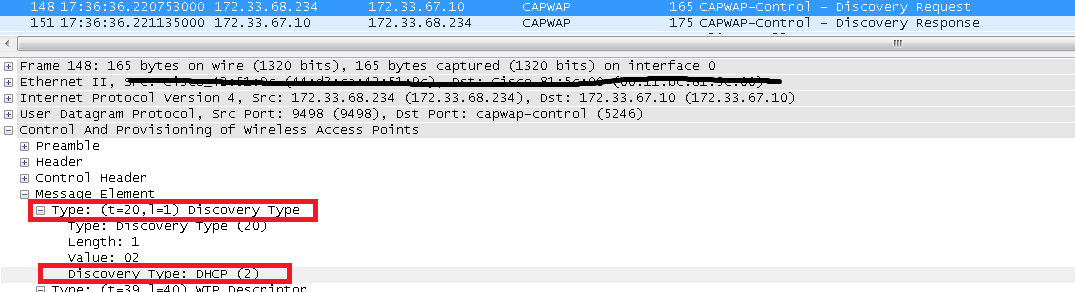
See the reference 6 , there are some examples about debug commands. Again, It is better to get packet capture. (Hit: compare your debug log and packet capture to identify whether the problem happens on AP discovery process or AP join Process.)
See you and Good luck !!
Reference
1.
Deploy and Troubleshooting Cisco Wireless LAN Controllers
2.
In this post, I will introduce how to troubleshoot AP joining process. I think it is very tough, but I will try to do my best.
(I have listed some references which are good resources to understand AP joining process, if you have time please read them. )
When you troubleshoot AP joining process you meet the first question that is "Where do I start or how do I begin" (Maybe this question is not just for troubleshooting this issue, possibility, for all of troubleshooting issues. :) )
The answer is that you need to have a plan and always modify your plan if the parameters of the problem change while you are troubleshooting.
// The plan of troubleshooting AP joining process //
1.
Understand the AP join process
If you understand it, you job will be much easier !!. Know the correct sequence of AP join process. See. What is Capwap? .
(After you collectl logs or packet capture, comparing with the correct sequence to identify where is the problem. )
2.
Understand your topology and Gathering logs
When your network has more than one AP and WLC, you should know which AP cannot join which WLC from topology. Once you identity that, you can start to gather logs from WLC and AP
- On WLC side
config paging disable
show time
show run-config
show cdp neighbors
ping
ping
show tech-support
show run-config commands
show msglog
show trap
show ap join stats summary all
show ap join stats detail AP_Mac_address
show ap eventlog
- On AP side
show cdp neighbors
ping
ping
show tech-support
"show run-config" and "show tech-support" are very important things, since you will understand the setting on WLC and AP.
/// options for complicate issues ///
For the difficult issue, you need to use the magic tool -- debug and packet capture. I will introduce some basic debugs, but remember modify your plan if the parameters of the problem change.
* WLC debug *
(WLC) > debug capwap events enable
(WLC) > debug capwap errors enable
( AP )# debug capwap client event
( AP )# debug capwap client error
3.
Analyzing data collected
If you find that ping is failure, it means your network readability has the problem. It is better to check your infrastructure.
"show ap join stats detail AP_Mac_address" is also very useful, since it can give you some hits about the last discovery request and last join request were sent from AP. See detail from the reference 5
See the reference 6 , there are some examples about debug commands. Again, It is better to get packet capture. (Hit: compare your debug log and packet capture to identify whether the problem happens on AP discovery process or AP join Process.)
See you and Good luck !!
Reference
1.
Deploy and Troubleshooting Cisco Wireless LAN Controllers
2.
"AP fails to join controller" - Lightweight Access Point (LAP) fails to join Wireless LAN controller (WLC)
https://supportforums.cisco.com/document/69341/ap-fails-join-controller-lightweight-access-point-lap-fails-join-wireless-lan
3.
Wireless LAN Controller and Lightweight Access Point Basic Configuration Example
http://www.cisco.com/c/en/us/support/docs/wireless/4400-series-wireless-lan-controllers/69719-wlc-lwap-config.html
4
Lightweight AP (LAP) Registration to a Wireless LAN Controller (WLC)
http://www.cisco.com/c/en/us/support/docs/wireless-mobility/wireless-lan-wlan/70333-lap-registration.html
5.
Troubleshooting Why an AP Does Not Join a Controller
http://www.cisco.com/c/en/us/support/docs/wireless-mobility/wireless-lan-wlan/100731-ap-not-join-con.html
6.
Troubleshoot a Lightweight Access Point Not Joining a Wireless LAN Controller
http://www.cisco.com/c/en/us/support/docs/wireless/4400-series-wireless-lan-controllers/99948-lap-notjoin-wlc-tshoot.html